FrontierStack turns your Mac into a high-confidence operations console for every server, service and device you run. Monitor health, control the fleet, harden security and resolve problems without living in Terminal.
FrontierStack combines native performance with layered safety: read-only diagnostics first, explicit approval before changes, local handling of credentials, and on-host monitors that keep watching when your Mac is asleep. It is the operational experience of Enfour — running production services on Apple hardware since 1992 — distilled into one app.
Ask what is wrong in plain English. FrontierStack investigates with real tools and live system context, explains the cause, then proposes the exact repair for your approval — on this Mac or across remote servers over SSH. Use FrontierStack’s AI servers free for now, choose any major cloud AI platform, or keep it local with Ollama, LM Studio or Apple Foundation Models.
FrontierStack can serve as the infrastructure specialist inside a coding-agent, multi-agent or human/agent workflow. A coordinator can delegate a job without receiving your server passwords or private keys: FrontierStack discovers the right tools, applies its local guard-rails, asks you to approve changes, verifies the result and returns a durable receipt.
Use MCP and the CLI today, or opt in to A2A, MCP Tasks and CloudEvents previews as your coordinator supports them.
Instead of filling a model’s context with hundreds of tools, FrontierStack finds and returns only the permitted tools relevant to this job — avoiding common 128-tool limits.
Discovery, prompts, agent cards and chat messages never grant permission. App Lock, caller scope, approvals, destructive-data protection and the audit trail remain local.
Purpose-built panes turn deep system detail into decisions you can make with confidence.
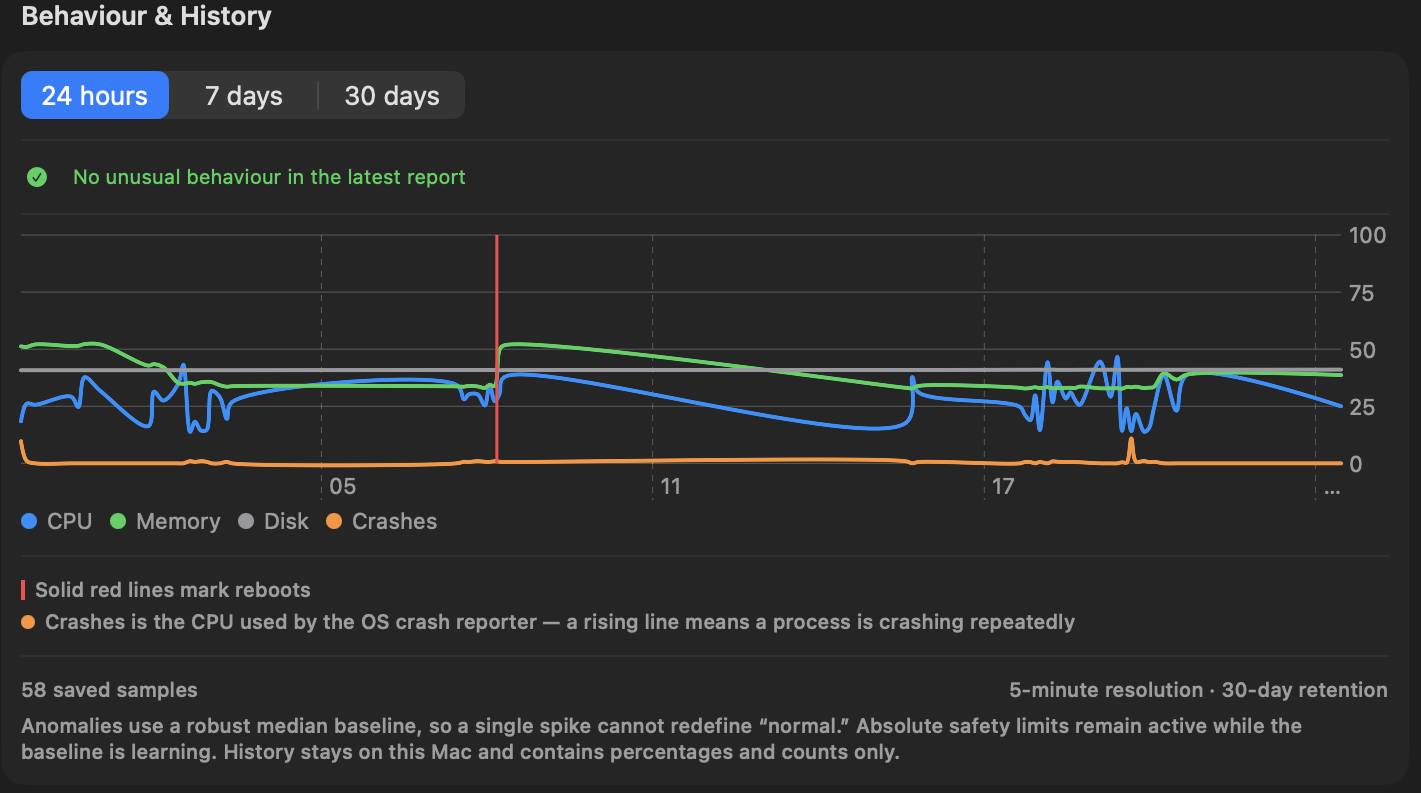
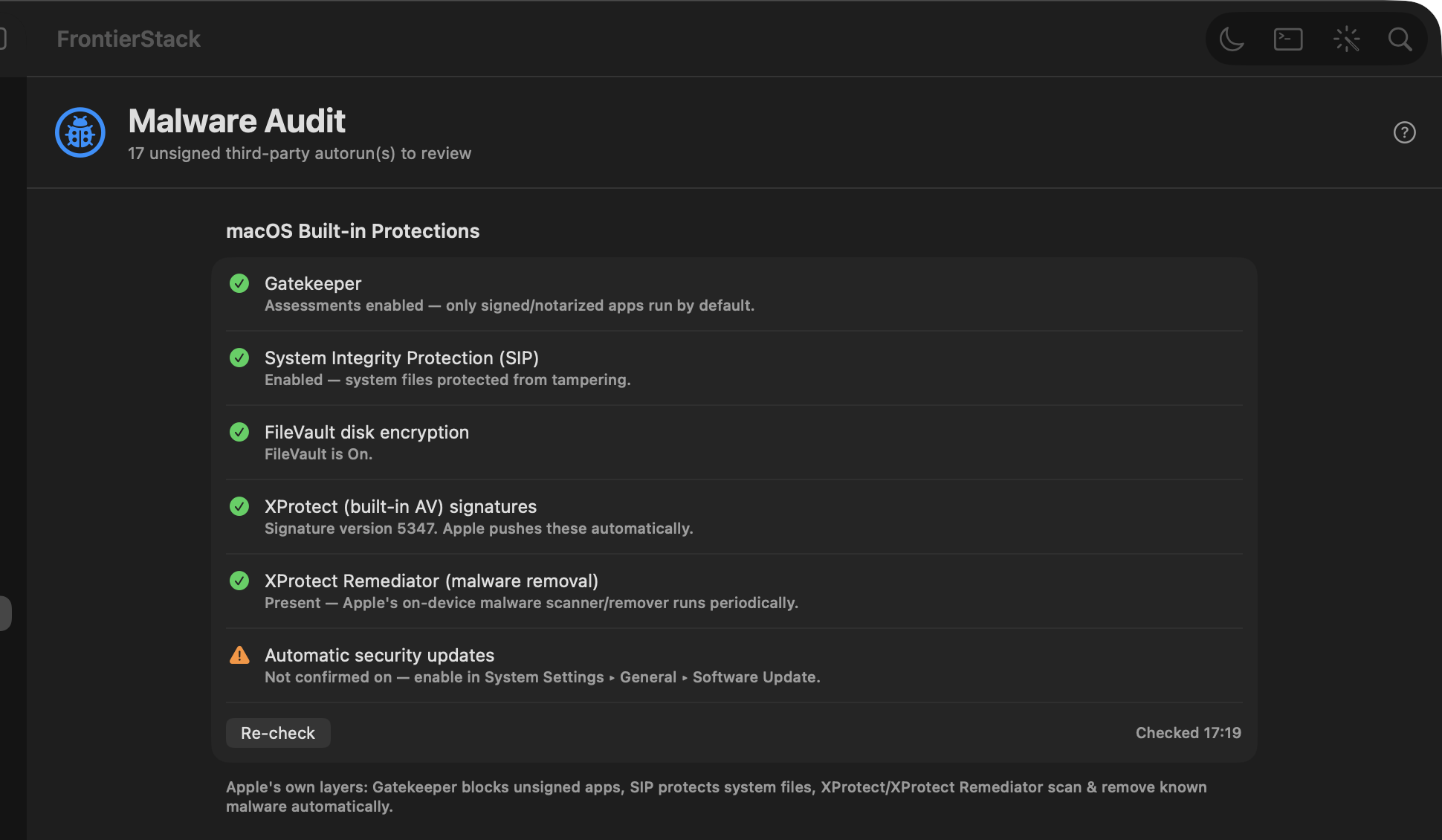
Recent additions make discovery, security operations and mobile response more complete.
Progressive LAN discovery identifies Macs, Windows PCs, Apple TV, routers, printers and more. Focused fingerprinting can add LLDP/SNMP checks, preserve known names and flag AnyDesk or Tailscale support.
See Strix installation, version, API status, scan progress and findings alongside connected repositories, domains and CI providers — then launch or repeat scans from FrontierStack.
Inspect channel usage, filter crowded network lists, pin the connected network and keep location-aware device knowledge for faster, more accurate future scans.
The free iPhone and iPad app brings live fleet health, push alerts, service controls, secure shell and the AI Administrator with you.
Fleet licences can require a YubiKey, Google Titan or FEITIAN FIDO2 key before FrontierStack does anything. Add up to three backup keys; compatible USB-C, Lightning and NFC models also work with the iPhone and iPad app.
Infrastructure money is multi-currency by nature: a US SaaS bills in dollars, a European registrar in euros, a Japanese licence in yen — and your store may earn in all three. FrontierStack keeps every figure in the currency it actually moved in, and converts only when you ask for a total.
Spend & Billing gathers every recurring charge — AI plans, cloud and hosting, SaaS, domains, free-text anything (“Acme server rentals, €20/month”) — each stored in the currency it is billed in. Totals convert to your chosen display currency at editable, dated rates you can refresh from the ECB fixing. Most service panes carry a Plan & Cost row, so recording what you pay happens where you already are.
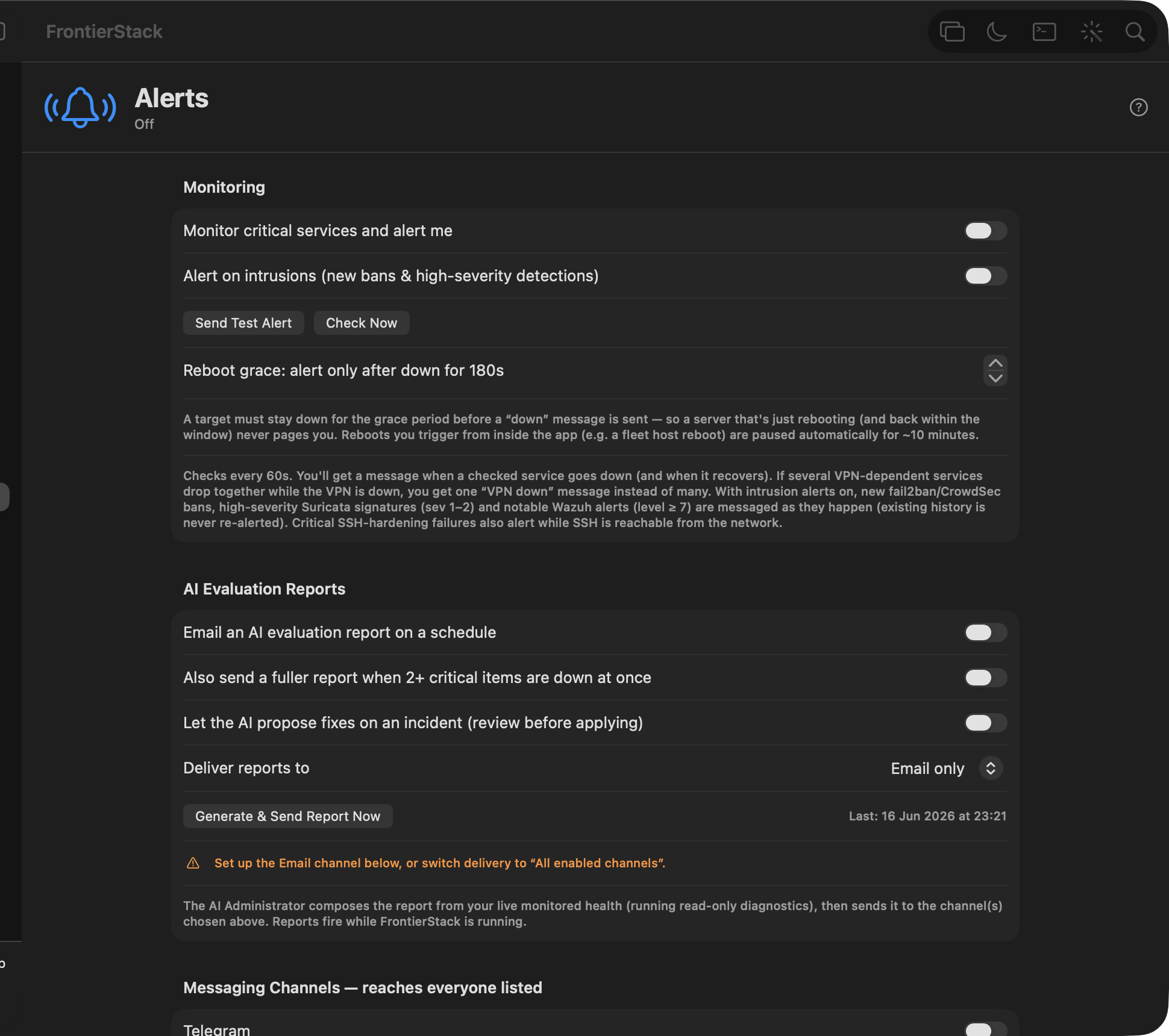
Set a monthly budget and FrontierStack raises an alert at 80% and 100% — covering every subscription, in any currency, even services with no API. Connected AI accounts carry their own monthly limits against auto-synced spend, DigitalOcean, Vultr and Linode report month-to-date charges with thresholds of their own, and a billing-health watcher flags failed payments before a service goes dark.
On the earning side, Sales Channels sums today’s takings across Square, Stripe, PayPal, Shopify and more — per currency, deliberately never converted, because received money deserves exact figures. Store Health tracks revenue against ad spend even when they bill in different currencies, converting both only to compute an honest Net and ROAS.
Monitor live health, receive push alerts and take action from the free FrontierStack iOS app. Start or stop services, use a secure remote shell, open device interfaces and work with the AI Administrator — at home, on-site or on the road.

FrontierStack meets your infrastructure where it is — across generations, operating systems and the growing collection of devices around them.
Keep valuable Apple server hardware useful. Link an Xserve or an older Mac running macOS Server over SSH, then monitor services, inspect logs, run diagnostics and manage it from your current Mac.
Bring Macs, Windows PCs and servers, Linux and BSD hosts, Raspberry Pi systems and virtual machines into the same fleet. Discover them, identify what they are, then monitor and operate them over the best available connection.
Monitor and control SwitchBot, Zigbee and HomeKit-exposed devices, cameras, sensors, smart plugs, UPS units and network gear. Pin them to Places, automate responses and use remote power to recover a server that SSH cannot reach.
Two editions, one app — pick the side that sounds like you.
One Mac, your own stack.
Many machines, serious infrastructure.
From a single laptop to a fleet of macOS and Linux machines — provision, monitor, secure and automate.
Apache/Nginx, MySQL/Postgres, PHP, virtual hosts, TLS — create a site and DNS in one wizard.
One Mac drives every linked server: run commands, audit, deploy, compare config drift across the fleet.
macOS firewall, pf, fail2ban, open-ports watch, a Malware Audit pane (XProtect, ClamAV, YARA, VirusTotal), EDR fleet and a sandboxed AI Security Audit (exploitable-only, code or infrastructure).
Use FrontierStack’s built-in tool-using AI, or place FrontierStack behind Grok, Codex, Claude Code, Cursor and other agentic workflows over MCP. The model can investigate and request work across your Mac, Linux and Windows fleet; FrontierStack keeps credentials local, applies caller scope and approval rules, then verifies and audits the result. See agentic workflows.
Every recurring charge you have — AI plans, cloud and hosting, SaaS tools, domains and certificates — as weekly, monthly or annual, grouped by category with monthly and annual totals. Presets cover the common services and you can type any name, so a subscription with no API is tracked exactly like one FrontierStack can query. It also watches your paid services for failed payments and warns you before one stops working.
See worker-host health, detected runtimes, active jobs and durable terminal sessions across the boxes doing the work. The iOS companion exposes bounded Agent Activity without copying prompts, transcripts, terminal contents or credentials to the phone.
Your self-hosted and SaaS services together — install local ones or connect cloud accounts, 500+ in all, in one sidebar tailored to your use-case.
The free companion app puts your fleet in your pocket: pair with a QR code, watch live health, get push alerts, use the remote shell and control services from anywhere — over LAN, Tailscale or Cloudflare Tunnel, secured per device. Learn more.
A Channel Manager for vacation rentals — connect Hostaway, Lodgify, Guesty, Cloudbeds, Beds24 and more (or a custom AppSheet app) for live reservations, revenue and occupancy, sync OTAs (Airbnb, Booking.com, Vrbo, Expedia…) by iCal, and schedule cleanings with Turno.
Access points, cameras and door controllers have no power button — their switch port is it. See every PoE port's state, class and draw, watch the switch's power budget, and power-cycle a port to reboot a wedged device without a trip to the cabinet. Works with any managed switch supporting the standard PoE MIB (RFC 3621).
Run your own ZeroTier controller instead of ZeroTier Central — FrontierStack is the local admin UI it doesn't ship with: member approval queue, routes and IP pools, a flow-rule editor with its own compiler, security audit, Prometheus metrics and a warm standby. Administered over SSH against the controller's loopback API, so nothing is exposed.
Control SwitchBot, Zigbee and HomeKit-exposed devices, watch them on the Places board, and link a SwitchBot Smart Plug to a server to power it on/off — or power-cycle a hung machine when SSH won't answer. When a wedged server's database is still reachable, FrontierStack can even flush and cleanly shut it down over its own connection first, so a power reset is safe.
Turn an Obsidian vault into a two-way knowledge base — synced inventory, auto incident/change journals, and SOPs/runbooks the AI Administrator can search, follow and (with approval) draft. Browse and edit the whole vault in-app with live Markdown preview.
One place for every domain — from local & remote Apache vhosts, Cloudflare zones and the registrar monitor. Check DNS, HTTP, SSL/expiry, see which server serves it and whether it's a Cloudflare zone, and run an AI SEO audit (score + fixes) on any site.
Discover and monitor UPS units (macOS USB, NUT and apcupsd — APC, Dell, Omron, Buffalo, CyberPower, Eaton). Pin them to the Places board and get alerts on battery, low battery and comms loss; pair with auto power-cycle to ping-and-reboot a server.
Query any OID or apply a generic SNMP template (System, Interfaces, Host Resources, Printer, UPS, Synology, QNAP, APC) on any device — read switches, NAS, printers, UPS and more.
S.M.A.R.T. drive monitoring (with deep smartctl attributes — temperature, reallocated/pending sectors, predicted failure), AppleRAID set health with degraded/rebuild alerts, per-volume free space, and Time Machine freshness — all wired into the alerts engine.
On-host health checks for MySQL & PostgreSQL — liveness (won't-start / wedged), replication, and a corruption early-warning that flags trouble before a table goes bad — plus AI-assisted recovery and alerts that keep working even when your Mac is asleep or offline.
Temporarily expose a local dev server (localhost:PORT) for a debug or preview session — via a Cloudflare Quick Tunnel (public, no account), Tailscale serve/funnel, or a LAN forwarder — with an auto-expiry. The AI Administrator can open and close sessions too, over MCP.
Pick a preset and the app shapes itself to how you work.
The gear and setup we recommend for beginners — which Mac mini to buy, the stack, containers, AI, DNS and remote access. What we recommend →
Spin up many local sites without juggling multiple Terminal windows, save & schedule your scripts, and target Docker or cloud. Web dev on a Mac →
An AWS control panel on your desktop — S3, EC2, RDS, Route 53, budgets and IAM keys, plus your EC2 boxes over SSH. AWS dev on a Mac →
Manage containers and Compose projects — start/stop, logs, exec, prune — on Docker, OrbStack or Apple’s runtime, local or remote. Docker on a Mac →
Move sites, databases, PHP settings and WordPress onto a modern Homebrew stack. See migration guides →
Replace a stack of subscriptions with services you own and run. How it works →
Sourcing, POD, shipping, inventory and profit tools for commerce on a Mac. Drop-shipping →
POS, CRM, e-commerce, mail and accounting on hardware you control. Small business →
AV, media servers, cameras, IoT and the network behind the show. Venues →
One Mac, many servers: audits, deploys and drift detection over SSH. Fleet →
FrontierStack installs, monitors and secures the whole stack — locally and across your fleet — from a single native macOS app.
Download FrontierStackA full, searchable web Help center — plus 100+ Q&A pages on Mac server management, security and migration.
Open Help & Docs Browse the FAQGet release news, security tips and Mac-admin guides. No spam — unsubscribe anytime.