Chapter 15
The AI Stack
The other side of AI: not the assistant that runs your servers, but the AI infrastructure your servers run — agent runtimes, local models, sandboxes, GPUs and the bill for all of it, watched from one window.
The previous two chapters were about AI operating FrontierStack: the built-in Administrator (Chapter 13) and driving the app from your own tool over MCP (Chapter 14). This chapter is the reverse. It covers the AI infrastructure FrontierStack helps you run and monitor — agent platforms, local model servers, code sandboxes, browser automation, GPU fabric, ML tooling, governance, and the cost of all of it. These are services in the catalog like any other, grouped under the AI categories in the sidebar, but they deserve a chapter of their own because running AI is now a stack you operate, not a box you call.
15.1Agent Operations
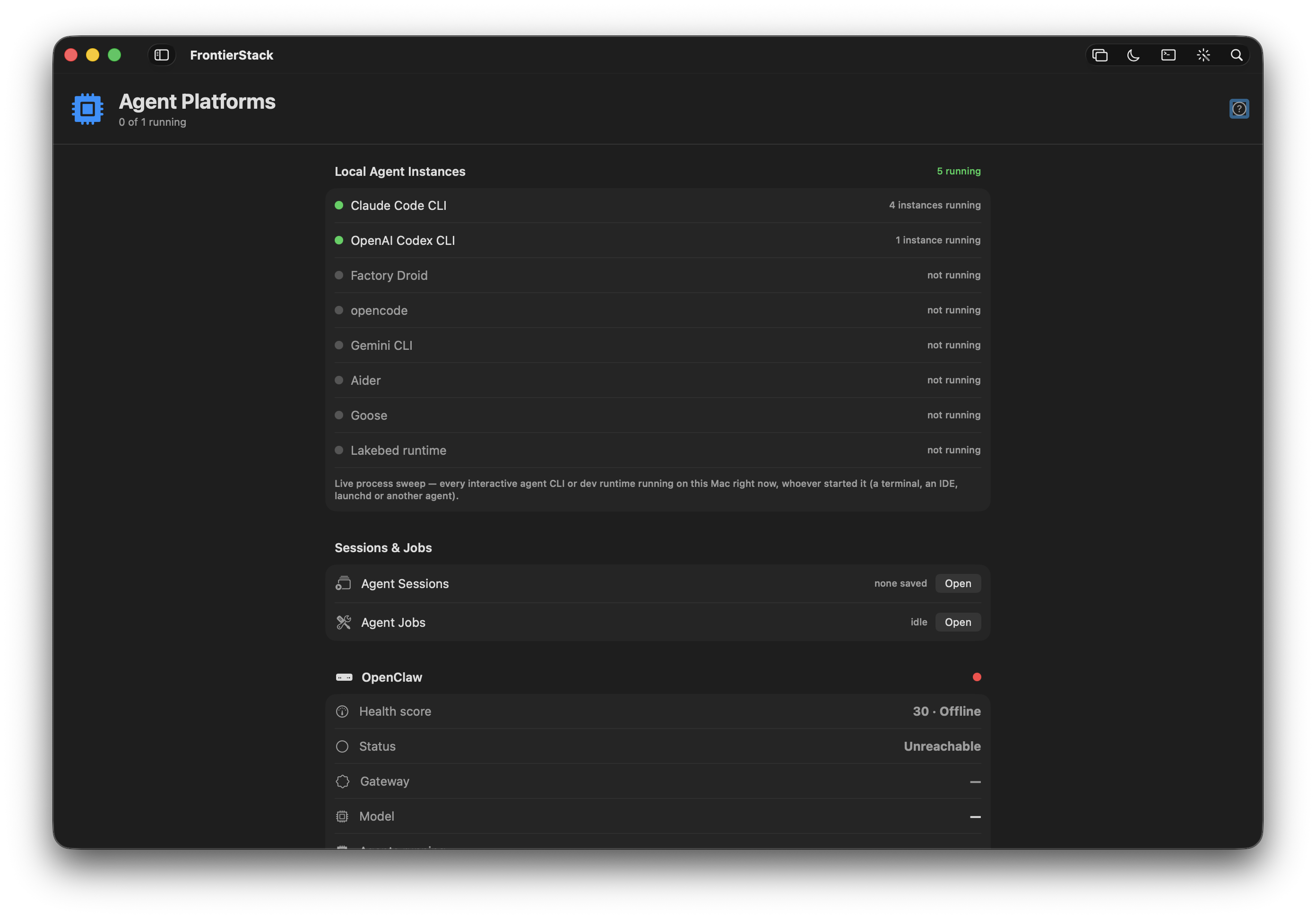
Open Agent Operations from the sidebar for the server-first view of agent work. Every fleet host appears with reachability, environment, CPU and memory, detected agent workers, and buttons for host details and a contextual shell. The shell is local for this Mac and follows the host's configured SSH, mosh or SSH3 trust settings for remote boxes. Runtime health, local coding-agent processes, FrontierStack sessions and agent containers remain on the same board. The AI tool get_agent_platforms exposes runtime state to the Administrator, so you can ask "which agent runtimes are down?" in plain English.
The runtimes fall into two kinds. Some are CLI runtimes — detected by their command-line tool being installed (and answering --version): the coding agents Claude Code, Gemini CLI, OpenAI Codex and Factory's droid. Others are HTTP runtimes that expose a status endpoint and are polled for live metrics. A handful of cloud agent products (OpenHands, Manus, Devin, OpenAI Operator, E2B) appear lower down as catalog entries you connect rather than poll.
| Platform | What it is |
|---|---|
| OpenClaw | Self-hosted agent runtime, monitored for running state and model. |
| Hermes | Agent runtime polled over HTTP for status, model and sessions. |
| DeerFlow | Deep-research / multi-step agent runtime. |
| LangGraph Platform | Graph-based agent orchestration; status and model surfaced on the board. |
| CrewAI Enterprise | Multi-agent "crew" runtime. |
| Microsoft AutoGen | Multi-agent conversation framework. |
| Genspark | Autonomous agent platform. |
| Agent Zero | General-purpose autonomous agent. |
| NVIDIA NemoClaw | NVIDIA agent runtime. |
| OpenAI Codex / Claude Code / Gemini CLI / Factory Droid | Coding-agent CLIs; detected by install + version, shown as on-demand. |
Because configured runtimes feed the broader system, a runtime that goes down — or hits a token quota (rate-limit, 429, billing) — raises an Alert and appears red on the Local Health board, in the services group. You configure each runtime's endpoint and credentials once; from then on it is watched like any other service.
15.2Activity, Work, Runtimes & Routing
Four companion views break the agent fleet down by operator task, all reading the same live state:
- Activity — the bell-shaped operator inbox. Needs You collects runtime failures, lost workers and failed sessions/jobs; Running shows current work; Recently Finished is a short run ledger. The toolbar bell opens it from anywhere.
- Work — three tabs for the runtime queue, goal-driven Administrator sessions, and isolated Codex/Claude sandbox jobs. OpenClaw cron jobs, paused state, tokens and one-shot job status remain visible in Queue.
- Runtimes — every configured local/HTTP engine, detected T3 Code worker, and cloud agent product, with reachability or credential state.
- Routing & Integrations — model routing/provider keys and repository access in two tabs. GitHub, GitLab and Bitbucket tokens stay in the Keychain and retain their live
/userchecks.
Agent runtimes and connectors authenticate with credentials you save once. Like everywhere in FrontierStack, those tokens live in the macOS Keychain, never in the app's settings file and never sent to a cloud model.
/user check confirms the token works; it does not limit what the token can do — that is the PAT's scope, set at GitHub/GitLab/Bitbucket.15.3Work sessions, T3 workers & the built-in terminal
Work ▸ Sessions is the manager for goal-driven ops and SaaS loops you build yourself — one-shot or recurring. A session has a plain-English goal, title, step budget, and a switch for whether it may make changes. Each session drives the same guarded tools as the Administrator (Chapter 13) and streams every step to a transcript you can stop at any time; scripts are never permitted from a session loop.
FrontierStack identifies a T3 Code worker only when 127.0.0.1:3773/.well-known/t3/environment returns a valid environment receipt. A generic Node process or open port does not count. Discovery is read-only and loopback-only: it does not expose the T3 server, pair FrontierStack, or grant access to T3 threads and approvals. A T3 mark appears on that server in the macOS and iOS fleet lists. Live T3 job counts require a separately authorized read-only connector and are not inferred from worker presence.
Every Agent Operations worker row has a shell button. FrontierStack opens a login zsh locally, or the server's configured SSH/mosh/SSH3 command remotely, inside the same SwiftTerm PTY used elsewhere in the app. Terminal Style imports iTerm2 (.itermcolors), Ghostty, Alacritty or Warp themes.
The adjacent Terminal Sessions button discovers durable tmux, GNU screen, and Zellij sessions on that host. It uses a bounded, read-only inventory and never reads the terminal screen, scrollback, command history, process environment, or commands. You can attach in FrontierStack's real PTY, or end one named session after confirmation. Session names and managers are strictly validated and an end is reported successful only after the host confirms that the session disappeared.
On iPhone and iPad, More ▸ Agent Activity provides the paired Mac's status-only view of running agent processes, FrontierStack sessions and jobs, configured runtimes, and detected worker boxes. It deliberately omits prompts, command lines, transcripts, environment variables, terminal contents, and credentials. Servers ▸ Host ▸ Terminal Sessions lists the same durable sessions. Listing and ending use the paired Mac; full-screen attachment is offered only when Direct SSH has installed this phone's key and verified the server identity.
15.4Running local models
You do not have to send anything to a cloud model at all. FrontierStack manages local inference servers and can point the Administrator at one of them. The big three local apps are first-class:
- Ollama — the simplest local model runner; pull and serve models, and select one as the Administrator's engine.
- LM Studio — the LM Studio pane detects the install, lists loaded models and what is downloaded via the
lmsCLI, and shows "N models loaded" or "no model loaded" in its header. - VibeProxy — the odd one out: not a model runtime but a bridge to the AI subscriptions you already pay for. Connect Claude Code, ChatGPT, Gemini, Kimi, Qwen, GitHub Copilot or Z.AI GLM once, and those models appear in the harness picker without a separate metered API key. The VibeProxy pane installs it with Homebrew, starts and stops it, carries the usual Group Start / Run at startup settings, and opens the CLI Proxy API dashboard for request logs and account status.
- LocalAI — a self-hosted, OpenAI-compatible server you run as a catalog service on port 8080.
Beyond these, the AI / LLMs category carries the whole self-hosted-inference shelf — vLLM, llama.cpp, Apple's MLX-LM server, Jan, LiteLLM (a proxy fronting 100+ providers), Open WebUI, AnythingLLM, PrivateGPT and RAG/vector tooling. The point of running one locally is privacy and cost: when the Administrator's engine is a local model (Ollama, a loopback endpoint, or Apple's on-device model), nothing is redacted because nothing leaves your Mac — the secret-scrubbing that protects cloud engines simply is not needed.
15.5Code sandboxes & browser automation
Agents need somewhere safe to run code and a way to read the live web. FrontierStack manages both.
For code, the E2B pane manages secure cloud sandboxes via the e2b CLI: enter an API key (stored in the Keychain as E2B_API_KEY, or authenticate once with e2b auth login), then list, spawn from a template, and kill running sandboxes — with a Kill All for housekeeping and an "include paused" toggle. A green dot marks running sandboxes; orange marks paused. It is the disposable, isolated machine an agent uses so its code never touches your servers.
For the web, the AI category includes browser and crawl tooling: Browserbase (managed headless browsers), Crawl4AI, Firecrawl and Apify for turning sites into clean, model-ready text, plus Playwright for scripted automation. These give an agent eyes on pages that have no API.
15.6GPU infrastructure & clusters
If your AI runs on real GPUs, the GPU Fabric pane gives you read-only health of the hardware. Pick a linked server and run diagnostics over SSH: GPU inventory and temperature (nvidia-smi), NVLink status, the GPU topology matrix, NVSwitch Fabric Manager health, DCGM inventory (dcgmi), InfiniBand and RoCE/RDMA links, Slurm GPU allocation, and composable-fabric CLIs (WEKA, Liqid, GigaIO). The GPUs live on Linux hosts, so this targets a server in your fleet; on a non-GPU machine the tools simply report "not found". Run one check or Run All Checks at once.
GPU thermals and load on a host are also surfaced through the standard host monitors (Chapter 8) when an agent is installed, so a GPU box that overheats raises an alert like any other machine. For scale-out, the AI Clusters category carries Exo (run one model across several of your Macs), Petals, Distributed Llama, Ray, Slurm and Run:ai; the ML Workbench category carries the experiment-tracking and pipeline tools (MLflow, ClearML, Weights & Biases, Kubeflow, JupyterLab) for the training side of the house.
15.7AI governance & safety
Running agents in production means watching what they do and bounding what they can. FrontierStack catalogs the AI Governance & Safety shelf so these tools sit alongside the runtimes they observe: Langfuse, Helicone and Arize Phoenix for LLM observability and tracing; Promptfoo, Ragas and garak for evals and red-teaming; Guardrails AI, NeMo Guardrails and Lakera Guard for input/output validation and prompt-injection defence; and governance platforms such as Credo AI and Holistic AI. Install and monitor them as catalog services; they are the audit trail and seatbelts for the agents on the boards above.
15.8The AI cost monitor
Running an assistant, your own agents, several local models and outside harnesses means spend in several places. AI Model Costs pulls it into one view. The header shows this month's total and the percentage of budget; a colour-coded bar turns orange at 80% and red at 100%. The AI tool get_ai_costs exposes the same figures to the Administrator.
The dashboard tracks three streams together:
- Metered API spend, per provider and model, computed from an editable price table (USD per million tokens), or entered directly from an invoice. Connect Accounts auto-pulls month-to-date spend from OpenAI, Anthropic, OpenRouter, DeepSeek and a self-hosted LiteLLM proxy — several accounts per provider, each its own cost line.
- Every recurring charge you have, not just AI. Presets cover the common AI plans, cloud and hosting (Cloudflare, Vercel, DigitalOcean, Hetzner, Backblaze…), SaaS tools (Apple One, Google Workspace, 1Password, Figma, Adobe…) and yearly costs like domain renewals, Apple Developer and TLS certificates — and you can type any name at all, so a service with no API is tracked exactly like one the app can query. Each entry is billed weekly, monthly or annual; the row shows what you actually pay while the totals normalise to a monthly figure. Entries group by category with their own subtotals, the header carries both monthly and annual totals, and toggling a row off excludes it from the totals without deleting it — useful when you are working out what to cancel. Your FrontierStack licence is added automatically, priced from your tier.
- Local CLI usage — a one-click scan of this Mac's Claude Code and Codex logs sums the month's tokens per model as an estimate.
Costs arrive in whatever currency each service bills — a US SaaS in dollars, a European registrar in euros, the FrontierStack licence in yen. Every entry keeps its native amount and currency, and the totals convert everything to your chosen display currency. Exchange rates are editable and dated, refresh on demand from the ECB daily fixing, and re-price history instantly when changed — budgeting estimates, not accounting entries. Most service panes also carry a Plan & Cost section, so you can record what you pay right where you manage the service and it lands in these totals immediately.
A by-provider breakdown (donut chart), a six-month trend with the budget line, and an Ask AI button that hands your spend to a cost-optimisation advisor round it out. A billing-health watcher probes connected paid services for out-of-credits, hard-limit, past-due or suspended states and raises an alert — catching a key that is about to stop working before it does. Spend-threshold alerts complete the picture: crossing 80% or 100% of the monthly budget raises an alert (recovery included), each synced AI account can carry its own monthly limit, and DigitalOcean, Vultr and Linode panes read this month's charges from the provider API with a threshold of their own.
FrontierStack User Manual · Version 1.0.0 · Chapter 15